 View full image ↗
From layered art to a usable puppet
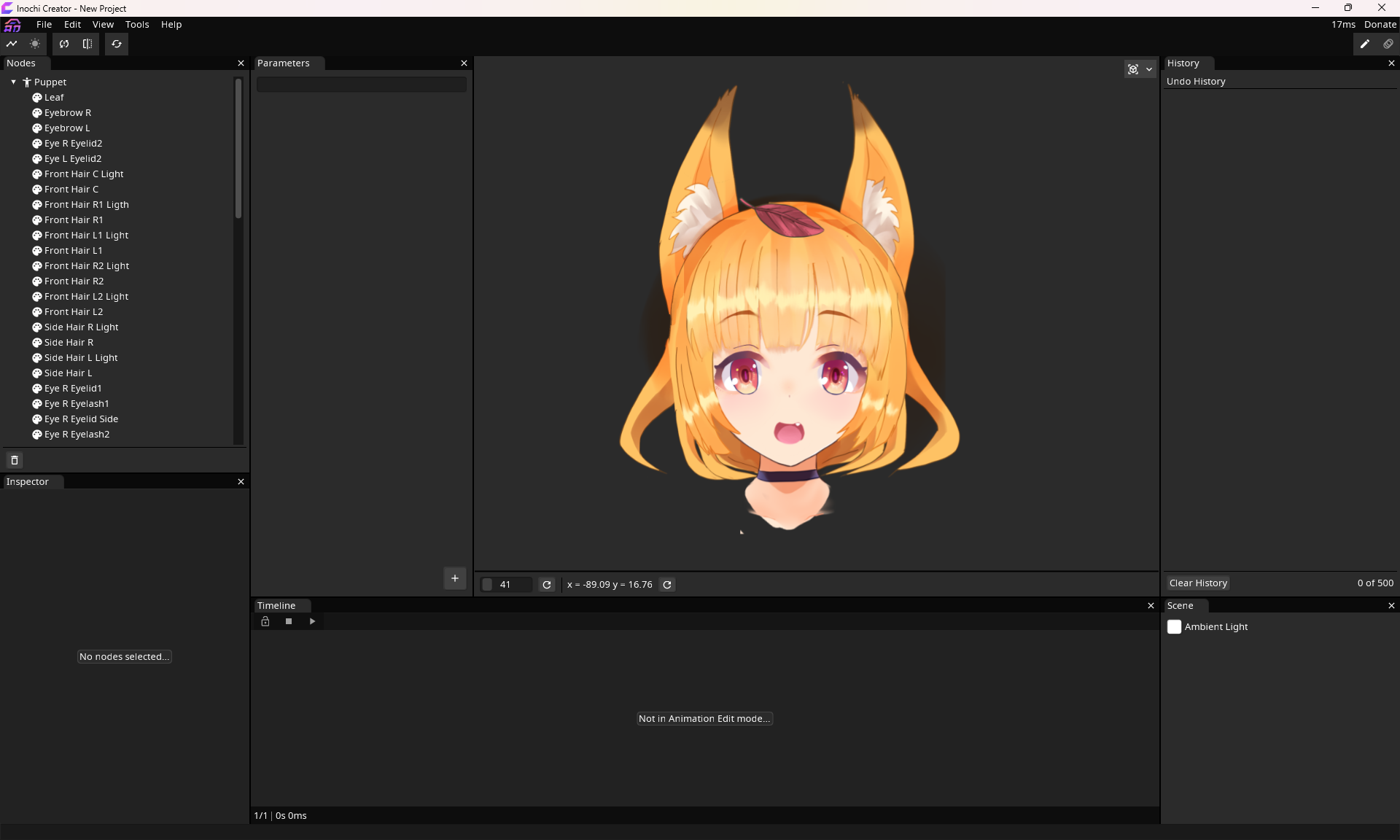
In the official tutorial screenshot, Aka's fox-eared head sits inside Inochi Creator while a long tree of art layers fills the left side. That tree is the useful detail. A 2D performance model is more than one flat illustration: its pieces need to move, overlap and respond to parameters. Inochi2D documents an open-source specification for real-time 2D character animation, with Creator as the rigging application and Session as the tool for using those rigs in VTubing. Its tutorial begins by importing a layered PSD, then saving an editable Creator project.
The documentation is refreshingly specific about awkward edges. Its FAQ says PSD import can require manual correction when blending modes or layer visibility do not arrive as expected. It also says existing Live2D models are not directly compatible and need re-rigging, even when a prepared PSD can be a starting point. That makes the choice of pipeline consequential. A finished image may look portable, but its rig and behavior are shaped by the format in which they were authored.
Where the performance happens
Inochi's own overview separates Creator's job from Session's. The rigger sets the deforming parts and parameters; Session receives tracking from another application and uses the model during a live performance. This split gives each stage a clear question. Does the art import cleanly? Do the eyes, mouth and head have useful ranges? Does the tracking input map to the expressions the performer wants? A technically valid puppet can still need direction before its reactions feel readable.
The project's open specification is meaningful because developers can inspect and implement the format rather than depend only on one opaque player. Openness, however, does not erase format differences or guarantee that a model travels unchanged into every other avatar app. The official download page distinguishes Creator and Session and currently describes different download and evaluation arrangements for them. Those are living details, so this article does not assign them a historical release date or promise future pricing. We could verify the workflow and the documentation's 0.7 framing, but not an Inochi2D 1.0 release. The honest story is the production chain visible now in the sources: layered art, careful rigging, a saved model and a separate performance tool.
Sources & limits
Official documentation establishes the workflow and limitations; it does not support a dated Inochi2D 1.0 release claim or universal compatibility.
- Welcome to the Inochi2D Documentation
first-party · Publication date not stated · Retrieved 16 September 2026 - 1. Setting Up
first-party · Publication date not stated · Retrieved 16 September 2026 - Frequently Asked Questions
first-party · Publication date not stated · Retrieved 16 September 2026 - Download Inochi2D
first-party · Publication date not stated · Retrieved 16 September 2026
Send a correction with the passage and supporting source.