 View full image ↗
The extension matters before the expression
You have a character file, an expression you like and a stream scene waiting for it. The next question is wonderfully unglamorous: can the performance software actually read that file? For a creator moving between avatar tools, this is the sort of detail worth checking before a reveal becomes a troubleshooting session.
VSeeFace’s official documentation describes support for VRM 0.x and its own VSFAvatar format. It explicitly excludes VRM 1.0 and Live2D models. That makes “I have a VRM” an incomplete compatibility check. The version belongs in your handoff notes alongside the model name, artist credit and export settings.
Tracking and broadcasting are different jobs
The application uses a webcam for face tracking, with optional Leap Motion hand tracking. Its documentation also describes sending and receiving tracking data through the VMC protocol. Those capabilities describe a pipeline; they do not promise that any particular camera, lighting setup or combination of applications will perform equally well.
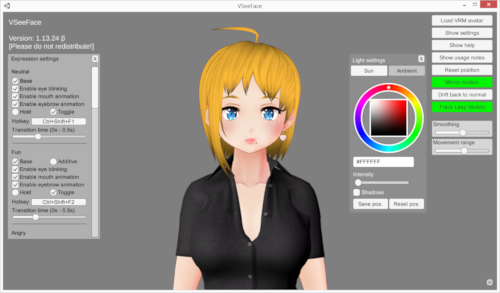
The pictured interface places a character between expression and lighting controls. It is an older screenshot supplied by the project, not evidence that we ran the current build. It is still useful for seeing the kind of work involved: choosing how the character reacts and how the result reads on screen.
A useful private rehearsal
Suggested exercise: start with one model, one camera and one plain scene. Check whether the file loads before adjusting the expression. Then try a short spoken sentence, a pause, a head turn and a glance away from the screen. Write down which part fails, if anything does. A file that will not import and a face that loses tracking need different investigations.
For the broadcast step, the official guide covers transparent OBS Game Capture, Spout2 and virtual-camera output. Pick one documented route and test the recorded result before layering on more effects. Our suggested check is deliberately small: confirm that the avatar appears where expected, that the background behaves as intended and that your voice remains intelligible.
Keep the setup legible to your future self
Save a short setup note with the model format, the applications involved and the capture route you chose. If someone else helps with a stream, that note gives them a starting point without asking them to reverse-engineer your whole desktop. It also makes a later upgrade less mysterious: you can compare one change at a time.
This is a reading of the project’s published guidance, with editorial rehearsal suggestions. We have not benchmarked latency, tested device compatibility or compared tracking accuracy. The linked documentation is the place to confirm current requirements before committing time or money to a setup.
Sources & limits
Product-format and capture claims come from VSeeFace’s official documentation, reviewed 16 September 2026. Rehearsal steps are editorial suggestions, not reported hands-on results. The page supplies no original publication date; the pictured interface is an older official example.
- VSeeFace — official documentation and FAQ
first-party · Publication date not stated · Retrieved 16 September 2026
Send a correction with the passage and supporting source.